IPTV Smarters Pro UK: Complete Download & Setup Guide (2026)
IPTV Smarters Pro is a popular media player application used by UK viewers across Android, Fire TV, iOS, Windows, and macOS devices.
The application works as a video player software engine and does not provide channels, live streams, or video-on-demand (VOD) content itself. You need an active IPTV subscription with compatible credentials, usually supplied through an Xtream Codes API containing a Server URL, Username, and Password, or an M3U Playlist Link.
1. Download Links by Device Platform
For a safer installation, use recognised app stores and official distribution channels whenever they are available:
+-----------------------------------------------------------------------------------+
|                        OFFICIAL DOWNLOAD CHANNELS & APPS                          |
+-------------------+-----------------------------+---------------------------------+
| PLATFORM          | APP STORE NAME              | INSTALLATION METHOD             |
+-------------------+-----------------------------+---------------------------------+
| Android Phone/Tablet | IPTV Smarters Pro           | Google Play Store            |
| Amazon Firestick  | Downloader / Official APK   | Downloader Sideloading  |
| iPhone / iPad / Mac | Smarters Player Lite       | Apple App Store                 |
| Windows 10 / 11   | Smarters IPTV Pro           | Microsoft Store / Official Build|
| Smart TVs (Android) | IPTV Smarters Pro          | Google Play Store               |
+-------------------+-----------------------------+---------------------------------+
Amazon Firestick & Android TV
- Install the free Downloader application from the Amazon Appstore.
- Open Fire TV settings:
My Fire TV>Developer Options> enableInstall Unknown Appsfor Downloader. - Launch Downloader, enter the verified numeric code or direct URL for the IPTV Smarters Pro package, and select Install.
Apple iOS & Apple TV
On compatible Apple devices, search the Apple App Store for Smarters Player Lite or another supported Smarters application. The available version can vary by device and region, so check the current App Store listing before installing.
Windows PC & Mac
Windows users can check the Microsoft Store for a compatible Smarters application. Mac users should use a current compatible player version from its recognised distribution source rather than downloading unknown installer files.
2. Setting Up Your Subscription
Setting up IPTV Smarters Pro is straightforward once you have your provider’s login information:
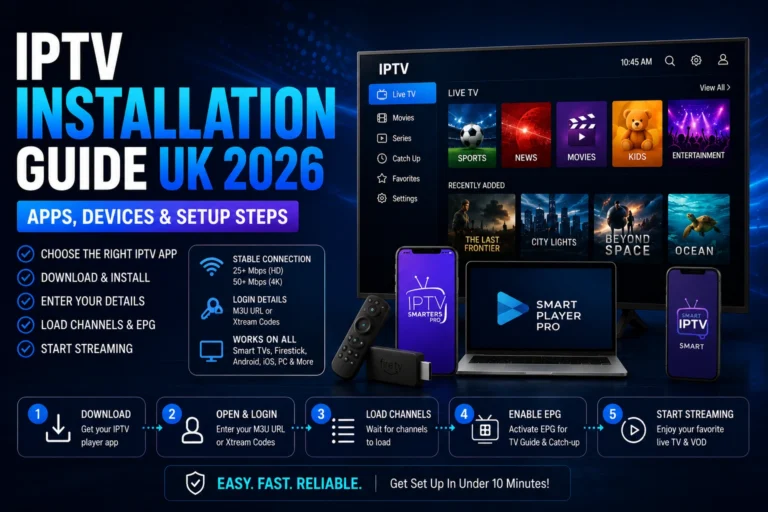
1.Select Authentication Type:Method Selection.
Launch IPTV Smarters Pro. On the initial setup screen, select Login with Xtream Codes API or choose Load Your Playlist or File/URL when using an M3U Playlist Link.
2.Enter Credential Strings:Data Input.
Enter a playlist reference name such as My TV. Then carefully enter your Sky Glass IPTV Username, Password, and Server URL, including any required port number.
3.Import Channels & EPG:Database Fetch.
Select Add User and allow the application time to retrieve your live channel categories, VOD information, and Electronic Program Guide (EPG) data from the supplied service.
4.Configure Favorites:Optimization.
Open your channel categories and add frequently watched channels to your Favorites list. This creates a cleaner viewing experience and makes regular channels easier to access.
3. What’s New in Version 5.0+
The Smarters Pro 5.0+ updates focus on improving usability, playback behaviour, and compatibility compared with older application builds:
- Improved EPG Synchronization: Better handling of Electronic Programme Guide data can make programme information easier to manage.
- Enhanced Video Decoders: Compatible hardware decoding can improve playback performance for supported HD and 4K video streams.
- Updated VOD Layout: A more organised interface makes movies and TV series easier to browse when supported by the connected IPTV service.
- Player Stability: Updated builds can provide improved reliability when loading larger channel playlists and extensive VOD libraries.
4. Troubleshooting Common Issues
| Symptom | Cause | Resolution |
| “Invalid Details” Error | Incorrect login information, server details, or an inactive subscription. | Check case-sensitive username and password details, verify the Server URL, and confirm that your subscription is active. |
| Buffering / Black Screen | Weak Wi-Fi, local network congestion, ISP filtering, or overloaded service infrastructure. | Test your broadband connection, restart the router and device, and use Ethernet where possible. Check whether any ISP filtering settings affect the connection. |
| Blank TV Guide (EPG) | EPG information did not synchronise correctly during the initial playlist update. | Open the application’s EPG settings and refresh the programme guide. Recheck the subscription credentials if the guide remains empty. |
| App Keeps Closing | Limited device memory, outdated software, or excessive application cache. | Restart the device, clear the IPTV Smarters Pro cache, and update the application where a newer compatible version is available. |
Frequently Asked Questions
Is IPTV Smarters Pro completely free?
The basic player can be available without a separate subscription fee, depending on the platform and current application version. Some versions or platforms may offer optional paid features, so check the relevant app-store listing before installing.
Does IPTV Smarters Pro come with free channels?
No. IPTV Smarters Pro is a media player and does not provide its own channel catalogue. You need an M3U playlist link or Xtream Codes API profile from an Sky Glass IPTV subscription provider to load available content.
Can I run IPTV Smarters Pro on a Samsung or LG Smart TV?
Availability depends on the television model, operating system, and current regional app-store listings. If a compatible Smarters application is available through the Samsung Tizen App Store or LG webOS Content Store, you can install it directly. Otherwise, an external Amazon Firestick or Google TV device can provide another compatible playback option.